/e/OS, favorite tech 2025
/e/OS is a Google-free version of Android that has the level of polish befitting a daily driver.
While trying different mobile operating systems, I came across a really interesting option called /e/OS. I learned about /e/OS through its association with the Fairphone. I’ve been following the Fairphone from a distance because it’s the rare phone that’s designed for repair. I noticed that you can buy the Fairphone pre-installed with /e/OS from Murena (the developer of /e/OS). And if it’s good enough to pre-install on a phone, it’s most certainly good enough for me. Murena even sells refurbished Pixel 5s with /e/OS, and because I had one lying around, it was game on.
The Pixel 5 is the newest of my “old” phones so it has the best specs of all my cast-offs. It has 8 GB of RAM, a fast processor, great battery life, and a sharp display. It’s thin, measuring only 8 mm thick, with basically no camera bump. The screen has small bezels and the edges of the phone curve to match the corners of its screen which makes the screen feel edge-to-edge. I really like the shape, size, and the look of the Pixel 5. It’s an attractive package with hardware that has many good years left in it. But at only five years old, it won’t receive any more major Android updates. And since it won’t receive updates, it’s fair game to unlock the bootloader and install something else.
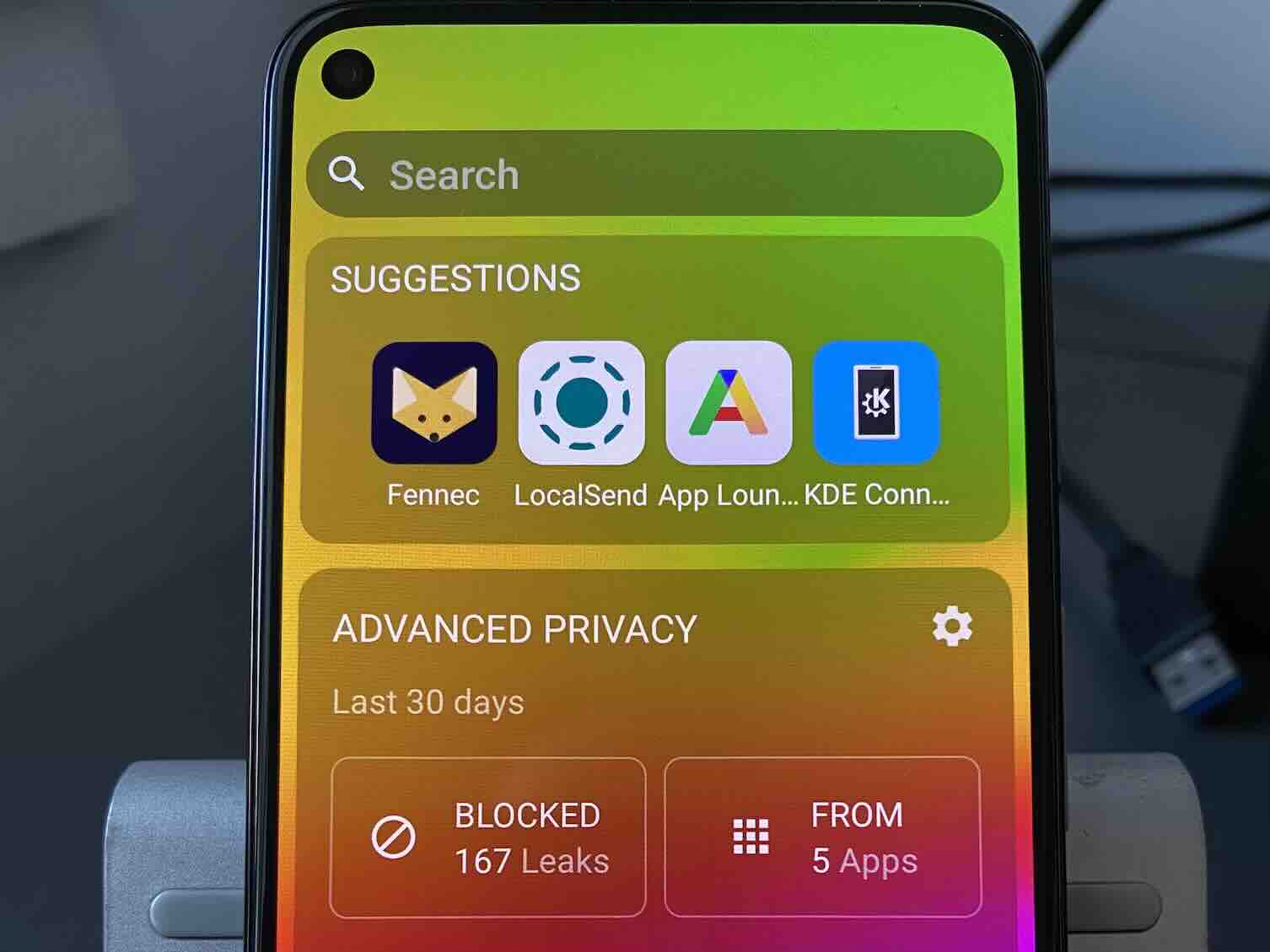
After installing /e/OS on the Pixel 5, I was struck with the polish of the launcher/home screen. The /e/OS launcher borrows heavily from classic iOS before version 14. Every installed app is on the home screen, as opposed to having some app shortcuts on the home screen while the rest are tucked away in the big list of all apps (the app drawer). You can drag and drop app icons into folders, and there is a dock at the bottom of the screen that holds four icons. Also similar to iOS 13 and earlier, widgets are restricted to the left of the home page, and shown as a verical list. It includes built-in widgets for app suggestions (much like Siri suggestions), weather, and Advanced Privacy (more on that later).
The first thing to do with a fresh install of /e/OS is get the apps I want. Now this is a “de-Googled” version of Android, so it doesn’t come with the Google Play Store. Instead it has the App Lounge. The App Lounge is interesting because it has all of the apps from the Play Store, but you don’t need to be signed in with a Google account. It means that despite having a de-Googled experience, I’m able to use all my usual third party applications such as 1Password, Chase, Spotify, and Todoist. In addition to the Play Store apps, it has all of the apps from F-Droid, the open source Android app repository. I appreciate that open source and commercial apps are in the same unified interface. I have a mix of Play Store apps with open source apps, and I can receive automatic updates for both. It’s very convenient and without requiring a Google account.
A major feature of /e/OS is its Advanced Privacy features. And before I get into it, I need to describe what privacy means in this case. Here the privacy concern is that mobile apps collect data about your app usage (often called analytics). They do this mostly through well-known analytics and advertising services (e.g. Firebase and Admob). By default, /e/OS blocks connections to these services. What that does is prevent mobile apps from collecting data that can be used to track your activity across the web. The blocking and reporting of blocked attempts is referred together as Advanced Privacy. You can view which services were blocked and which apps attempted to use them in either the system settings or from the Advanced Privacy widget.
Taken together, it’s a great mobile operating system and all without a Google account. So what’s the catch?
I mentioned earlier about the App Lounge providing apps from the Google Play Store. I can’t imagine Google is happy about their Play Store apps being available on an unofficial platform. Additionally /e/OS includes something called MicroG, which is an open source alternative to Google Play Services. Google Play Services solves the problem where Android users all have different versions of Android. To smooth out the differences between the versions of Android, Google create Play Services, a set of features available to other apps that that can be delivered and updated through the Google Play Store. All of this is replaced by MicroG on /e/OS.
My main concern is that these are not supported use cases. Google has no interest in making sure this continues to work, and if anything, they will do things to break it. If there’s something keeping /e/OS and MicroG safe from retribution, it’s that the install base is so small. If /e/OS gained steam, Google may take active measures. And unless the European Union (Murena is based in the EU) is willing or able to step in, Google could break the App Lounge and/or MicroG.
To be fair, these issues have been true for the entire lifetime of /e/OS (since 2020) and MicroG (since 2015) and today everything works fine. But I have to mention my concerns about its future.
Conclusion
In my survey of alternative mobile operating systems, I’m looking software that lets old hardware do something, and that something may not be a full-fledged mobile experience for daily use. I’ve written that LineageOS is the best alternative mobile operating system because it’s available for a lot of phones. Installing it will often give you a newer base version of Android, adding years of modern software and application support. /e/OS doesn’t support nearly as many devices, but it adds some extra features and a level of polish that makes it attractive for daily use.
My primary phone is the Light Phone 2, but I still live in the modern world and need access to third party applications. This is especially true as more services require the use of a mobile app and make analog options (like a printed Metra ticket) less convenient. For these cases, I have a six year old iPhone 11 Pro which gives me access to essential apps. But the dual problems of future garbage and software precarity means that the hardware is not made to last forever and the software changes independent of my needs, beyond merely supporting my phone.
With my goal to only buy second-hand consumer technology, I’m thinking seriously about what that future looks like and its limitations. I’m looking for tools that enable this future for me. /e/OS gives me a commercial-free mobile operating system and it’s really very good! It’s a strong contender for my future smartphone OS, and I’d welcome it.