Published

The best alternative to iOS and Android is... Android

We need alternative software that extends the useful lifespan of mobile phones and we need it now. The phones getting pushed into the back of junk drawers today1 have 8-core processors with 6 GB of RAM or more2. We’re talking about hardware comparable to low-end and mid-range laptops. And for many of those devices, the manufacturer stopped providing software updates, locking it to a version of Android that falls farther behind every year.

postmarketOS

I want to re-purpose abandoned devices. And if possible I’d like to use the opportunity to support my other values and priorities like software freedom and breaking out of the iOS/Android duopoly. In my perfect world, an alternative mobile operating system is one based on Linux because of its openness, extensibility, and access to a large ecosystem of software. That lead me to postmarketOS. It’s a real Linux distribution for (mostly) Android phones with the goal “to extend the life of consumer electronics… [to] promote a healthier and more sustainable society.” Exactly what I’m looking for!

Playing around with postmarketOS has been less playing and more fumbling. I installed it on any device that might work, including a Nexus 5, a Moto G5 Plus, and a Pixel 3a XL. The results range from a non-starter (Moto G5 Plus), to unusable even with the most minimal user interface (Nexus 5), to lousy but recognizable as a mobile operating system (Pixel 3a XL).

To be fair, the postmarketOS team is open about the rough edges. They say that “postmarketOS is definitely not yet ready for everyone”. But based on my tinkering, the word “yet” still does a lot of heavy lifting in that statement. The things that aren’t working, or not working well, means that postmarketOS is not ready for pretty much anyone. I’ve heard anecdotally that certain devices such as the OnePlus 6T work well. I could buy one of those, but it’s not really my goal to use postmarketOS. I want to install something useful onto the hardware I already have lying around.

My hope was that even if I couldn’t use postmarketOS as a full-fledged mobile platform, I could at least use it as a web/application server since that’s a pretty baseline Linux-y activity. And if the only thing postmarketOS could do is turn Android phones into home servers, that’s still a very useful tool in the fight against e-waste. But very few postmarketOS phones have support for USB-OTG (on-the-go) – 20 by my count. USB-OTG allows a phone to act more like a normal computer and be the host for other USB devices that connect to it. USB-OTG is necessary to use wired Ethernet, an essential feature even for small home servers. The Pixel 3a XL didn’t have support for that, so I couldn’t use it as a server. Since postmarketOS on the Pixel 3a XL was already a lousy experience from a mobile/graphical perspective, that was the end of the experiment. I don’t have any devices on-hand that will become more capable by using postmarketOS.

A lot of great work is happening in the postmarketOS project. More devices are added to their stable release every few months, and the feature support for existing devices is improving. I still think postmarketOS will play a role in the future of up-cycling old phones, but what that role will be and when it will happen is unclear. Today postmarketOS does not solve the problem of having an out-of-support smartphone that I want to revive. It’s more oddity than utility.

LineageOS

LineageOS is another alternative operating system available for Android phones. It’s based on the Android Open Source Project (AOSP), the open source core of the Android operating system that Google and device manufacturers use to create their own versions of Android. It’s been around a long time, having split out from the CyanogenMod project.

I have to admit, as someone looking for an alternative to Apple and Google, a version of Android feels a little unsatisfying. Though much of Android is open source, it’s still controlled and directed by Google. On the app side, Google has total control over the Google Play Store, which has been deemed (correctly) to be a gate keeper between software providers and end users. While it’s possible to load (not sideload) applications outside of the Play Store, Google is asserting control3 over that too.

Even if Google is a perfectly benevolent steward of the platform, Google’s involvement in any project casts doubt on its future. Will they lose interest in Android in favor of another operating system or kill it off entirely?

Setting aside concerns about the future of Android, let’s focus on what LineageOS can do today. It’s available for a relatively large number of Android devices, and those devices have full hardware support. It keeps updated with the latest major Android version updates. And it can run the Google Play Store. It has everything a normal person would expect from a mobile operating system.

I installed LineageOS on a Motorola G7 Play and it instantly became a modern device. Previously the phone was stuck on Android 10 and LineageOS brought it up to Android 15, adding on about five years of modern software and application support. Installing LineageOS made the phone more capable today. I can’t ask for more than that.

Conclusion

When thinking about smartphone hardware as future garbage, I’m forced to reckon with the gap between how I think the world should be and how the world really is. I don’t love that my best option for old smartphones is Android, but squeezing more life out of aging electronics is an exercise in making do. It doesn’t do any good to get bogged down in a middle class morality when the choice is between something useful or the landfill.

I’d prefer to install new software that lives up to my highest aspirations of security, privacy, openness, software freedom, and all that good stuff, but that ship has sailed. The original sin of e-waste is in the product design and manufacturing. Now whatever’s in the product is in the product. And of course it’s easier to put an alternative Android on a device designed to work with Android than it is to port over a completely different operating system.

LineageOS is here now and it’s quite good. For the time being, I’m taking a pause on tinkering with postmarketOS and Linux for smartphones. My time is better spent getting comfortable with Android rather than holding out for some ideal that may never come.


1. As of 2023, phones are replaced every 3.6 years on average. So the average phone replaced today was originally bought in 2021/2022. https://www.sellcell.com/blog/how-often-do-people-upgrade-their-phone-2023-statistics/

2. Amount of RAM in phones sold in 2021: Google Pixel 6: 8GB, Pixel 6 Pro: 12 GB, Samsung Galaxy S21 5g: 6-8GB, Samsung Galaxy S21 Ultra 5G: 8-16GB, Motorola Moto G30: 4-6GB RAM

3. “Starting [2026], Android will require all apps to be registered by verified developers in order to be installed by users on certified Android devices.” https://android-developers.googleblog.com/2025/08/elevating-android-security.html

Previously:


Published

It's not sideloading and it never was

Brent Simmons, Why NetNewsWire Is Not a Web App:

What I want to see happen is for Apple to allow iPhone and iPad users to load — not sideload, a term I detest, because it assumes Apple’s side of things — whatever apps they want to. Because those devices are computers.

I’ve been calling it sideloading all along, but of course installing software is not sideloading! Words matter. The way things are framed affects how we think about them. We’re so used to locked down systems that installing software from anywhere other than Apple’s blessed App Store feels practically like a hack. Our expectations have been manipulated and now there’s no accountability for it. I think most about these low consumer expectations and lack of corporate accountability in the context of e-waste.

Smartphones are computers. They have an open-ended purpose. We expect to be able to use them for things in the future that we don’t use them for today. If you’ve ever downloaded an app in a pinch, like for hailing a cab or presenting your ticket for an event, then you’ve seen this in action. Despite smartphones’ open-ended purpose, they’re locked down like appliances. And based on how we talk about “sideloading” of software, that’s what we expect as consumers.

It’s refreshing to come across a re-framing of loading (formerly sideloading) because it’s something I’ve taken for granted for so long. And I can feel that I’ve grown quite cynical. I wouldn’t have re-examined this framing of loading software without someone else pointing it out. When I learn about most any of today’s products, I just think Well, what do you expect?, I get to feel smug, and then I move on. I think that cynicism has ironically caused me to give a pass for some consumer-hostile practices. So this is a gentle reminder to expect better because when we expect less and less, corporations get away with giving us just that.

Previously:


Published

All software is precarious

Over the last couple years, I replaced my Mac-only applications with alternatives that are available for both Mac and Linux. The first and biggest switch was using Firefox, and I’m really satisfied with it. I felt like Mozilla’s history in creating a browser for Linux meant I should just jump into whatever Mozilla was offering, including the bookmarking and read-later service Pocket.

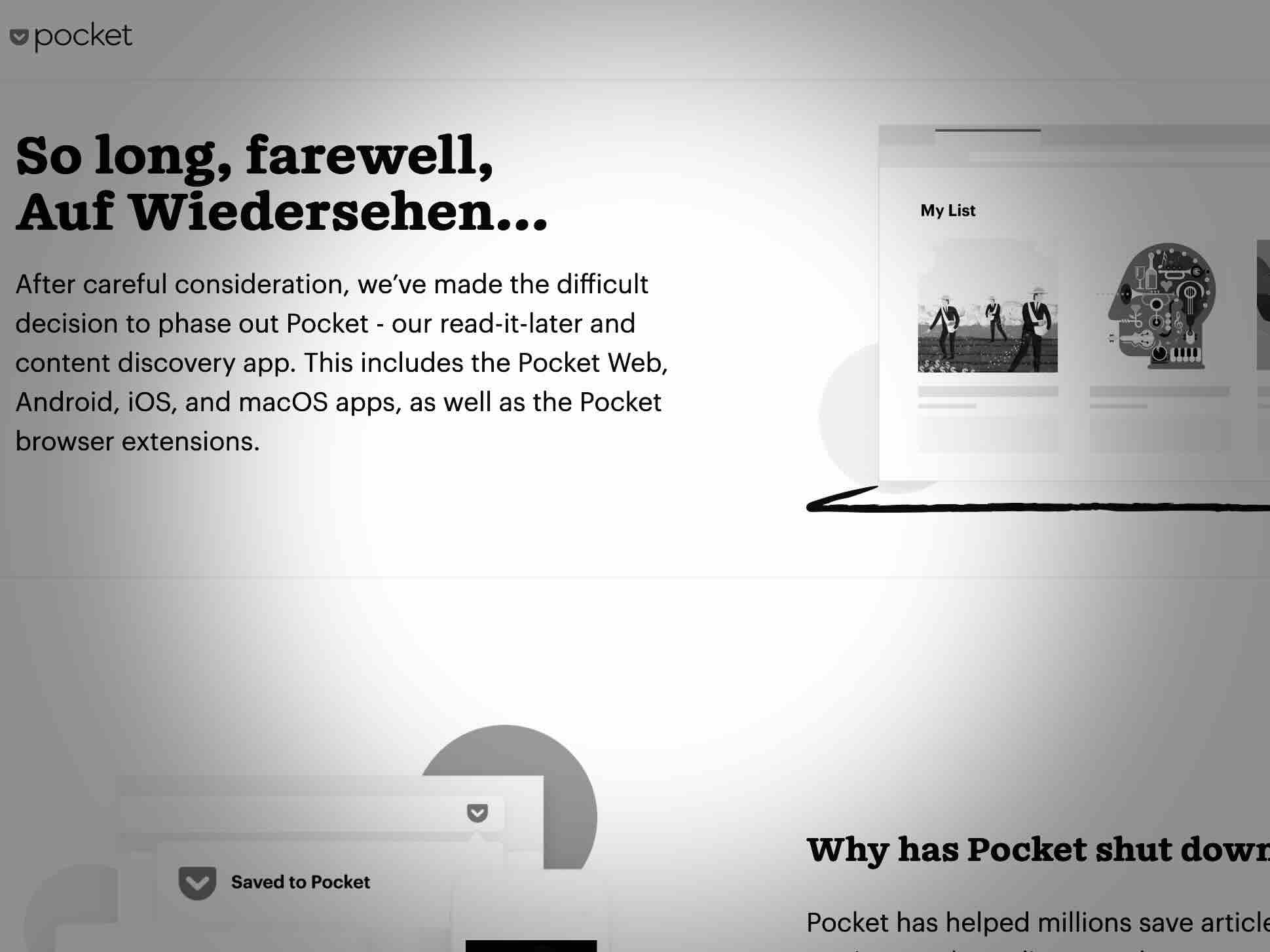
I used Pocket steadily ever since. Admittedly, a read-later service is at least partially a place I put things that I’ll never read. I read around 20-40% while the remainder is pushed down the unread stack, becoming a museum of things I wish I had the intellectual curiosity to care about. Nevertheless, it’s valuable to have a priveleged group of web links, especially ones that are cleaned up and easy to read. It was a nice addition to my tools for consuming the web. And then this past July, Mozilla shut it down for good.

I’m not naive about corporate interests. I try to avoid apps and services backed by big tech companies. For any private, closed source, or for-profit services that I use, I’m already brewing an exit strategy. I’m familiar with the purposeful degradation of platform quality a.k.a. enshittification, and I’m comfortable switching services and platforms. But this hits differently because it’s Mozilla. In all the apps I’m looking to replace, Pocket was not under consideration, not even in the same universe. That’s why it’s frustrating. It feels like replacing Pocket is a project that fell on me out of nowhere.

Look, it’s not for me to say what a company should or shouldn’t do, especially when providing a free service. I know that these things have ongoing costs and require maintenance, but I assumed whatever motivated Mozilla to acquire Pocket in 2017 would lead them to eat much of its cost too. I’m left wondering, if I can’t depend on Mozilla for the long-term, who or what can I depend on?

I think this why self-hosting is having a moment, even if for a limited group of people. The drawbacks of self-hosting are obvious. It requires technical background knowledge, research, and maintenance. It takes time to do all of that, and when you do, you end up with something that is often not as polished or feature-rich as commercial alternatives. However, using feature-rich commercial stuff is no protection from rug pulls of one kind of another.

Right now I’m self-hosting wallabag is my solution. I haven’t used it long enough to form a strong opinion about it, but so far it seems like a perfectly good one-for-one replacement for Pocket. It has a browser extension, mobile apps for reading, and it was able to import all my exported Pocket data. I can’t ask for more than that.

But it’s no salve for my broader concerns about relying on software. There’s no escaping that all software is precarious. It’s not because it’s technically unreliable or unstable, but because the overlap between my needs and the provider’s needs is fleeting. It’s especially the case for commercial software, but it’s still true for community software or even independent one-person shops.

Over at 404 Media, Sam Cole was similarly frustrated when she learned Pocket was shutting down. A colleague suggested to her “copy-pasting links to articles into a giant document to read later”, and she concludes by writing “I might have to start doing that.” It’s not a bad idea. A simple file-based solution is more durable and easier to maintain than anything will ever be.

I’ve been thinking since Pocket’s shutdown announcement that if I had saved my read-later links in a text file, none of this would matter to me. A text file is immune to the changing expectations of software. As I plan my exit from other commercial apps and services, it’s a great time to consider whether they can be replaced with a text file, document, or even a spreadsheet.

Previously: